Sunday, November 24, 2013

C# interview Questions

What is Object?
Objects are programming constructs that have data, behavior, and identity. Object data is contained in the fields, properties, and events of the object, and object behaviors are defined by the methods and interfaces of the object.
Objects have identity — two objects with the same set of data are not necessarily the same object.
Objects in C# are defined through classes and structs — these form the single blueprint from which all objects of that type operate.
Objects have the following properties:
· Everything you use in C# is an object, including Windows Forms and controls.
· Objects are instantiated; that is, they are created from templates defined by classes and structs.
· Objects use Properties to obtain and change the information they contain.
· Objects often have methods and events that allow them to perform actions.
· All C# objects inherit from the Object.
What is Class?
Classes are symbolic representations of objects; classes describe the properties, fields, methods, and events that form objects. Classes control user access to object items through encapsulation.
a class defines the data and behavior of the data type. Programmers can then create objects that are instances of this class.
Classes have the following properties:
· a class can inherit implementation from only one base class.
· A class can implement more than one interface.
· Class definitions can be split between different source files.
· Static classes are sealed classes that contain only static methods.
What is the difference between class and object?
Classes describe the structure of objects, while objects are usable instances of classes. Each instance is an exact yet distinct copy of its class. Because an object is an instance of a class, the act of creating an object is called instantiation.
Usually, changing the data in one object does not change the data in any other object.
How will you create objects?
A class defines a type of object, but it is not an object itself. An object is a concrete entity based on a class, and is sometimes referred to as an instance of a class.
Objects can be created by using the new keyword followed by the name of the class that the object will be based on, like this:
Customer object1 = new Customer();
When an instance of a class is created, a reference to the object is passed back to the programmer.

What is encapsulation?
Encapsulation is the ability to contain and control access to a group of associated items. Classes provide one of the most common ways to encapsulate items. Encapsulation allows you to control how the data and procedures are used. You can use access modifiers, such as Private or Protected, to prevent outside procedures from executing class methods or reading and modifying data in properties and fields. You should declare internal details of a class as Private to prevent them from being used outside of your class; this technique is called data hiding.One basic rule of encapsulation is that class data should be modified or retrieved only via Property procedures or methods. Hiding the implementation details of your classes prevents classes from being used in undesired ways, and lets you to later modify such items without risk of compatibility problems.

What is Inheritance?
You can extend the functionality of an existing class by creating a new class that derives from the existing class. The derived class inherits the properties of the base class, and you can add or override methods and properties as required.
In C#, both inheritance and interface implementation are defined by the : operator.
The base class should always be leftmost in the class declaration.
C# does not support multiple inheritance meaning that classes cannot inherit from more than one class. You can,
however, use interfaces for that purpose

e.g:
public class CoOrds
{
Private int x,y;
Public coOrds()
{
x=0;
y =0;
}

Public int X
{
get {return x;}
set { x =value;}
}

Public int Y
{ get { return y;}
Set { y=value ;}
}
}

You derive a new class, called ColorCoOrds, from the CoOrds class, as follows:

ColorCoOrds : CoOrds
{

}
ColorCoOrds then inherits all the fields and methods of the base class, to which you can add new ones to provide extra features in the derived class according to our needs.

The constructor of the derived class implicitly calls the constructor for the base class. In inheritance, all base class constructors are called before the derived class's constructors in the order that the classes appear in the class hierarchy.

How will you typecast to a baseclass?
you cannot use a reference to a base class to access the members and methods of a derived class even if the base class reference may contain a valid reference to an object of the derived type.
You can reference a derived class with a reference to the derived type implicitly:
ColorCoOrds color1 = new ColorCoOrds();
CoOrds coords1 = color1;
In this code, the base class reference, coords1, contains a copy of the color1 reference.

What is the use of base keyword?
You can access base class members in a subclass even when those base members are overridden in the superclass using the base keyword.
For instance, you can create a derived class which contains a method with the same signature as in the base class. If you prefaced that method with the new keyword, you indicate that this is an all-new method belonging to the derived class. You could still provide a method for accessing the original method in the base class with the base keyword.
For instance, say your base CoOrds class had a method called Invert(), which swaps the x and y coordinates. You could provide a substitute for this method in your derived ColorCoOrds class with code like this:
public new void Invert()
{
int temp = X;
X = Y;
Y = temp;
screenColor = System.Drawing.Color.Gray;
}
As you can see, this method swaps x and y, and then sets the coordinates' color to gray. You could provide access to the base implementation for this method by creating another method in ColorCoOrds, such as this one:
public void BaseInvert()
{
base.Invert();
}
You then invoke the base method on a ColorCoOrds object by calling the BaseInvert() method.
ColorCoOrds color1 = new ColorCoOrds();
color1.BaseInvert();
Remember that you would get the same effect if you assigned a reference to the base class to an instance of ColorCoOrds, and then accessed its methods:
CoOrds coords1 = color1;
coords1.Invert();

In case of Base class constructor and derived class constructor which one executed first?
Base class objects are always constructed before any deriving class. Thus the constructor for the base class is executed before the constructor of the derived class. If the base class has more than one constructor, the derived class can decide the constructor to be called.

e.g: public class CoOrds
{
private int x, y;

public CoOrds()
{
x = 0;
y = 0;
}

public CoOrds(int x, int y)
{
this.x = x;
this.y = y;
}
}

You could then change the ColorCoOrds class to use a particular one of the available constructors using the base keyword:
public class ColorCoOrds : CoOrds
{
public System.Drawing.Color color;

public ColorCoOrds() : base ()
{
color = System.Drawing.Color.Red;
}

public ColorCoOrds(int x, int y) : base (x, y)
{
color = System.Drawing.Color.Red;
}
}

What is Method Overriding?

A derived class may override the method of a base class by providing a new implementation for the declared method.
methods must be explicitly marked as virtual using the virtual modifier. Property accessors, as well as methods, can be overridden in much the same way.

What is virtual method?
A method that is to be overridden in a derived class is declared with the virtual modifier. In a derived class, the overridden method is declared using the override modifier.
The override modifier denotes a method or a property of a derived class that replaces one with the same name and signature in the base class. The base method, which is to be overridden, must be declared as virtual, abstract, or override: it is not possible to override a non-virtual or static method in this way. Both the overridden and the overriding method or property must have the same access-level modifiers.

What is polymorphism?
ability of a derived class to redefine, or override, methods that it inherits from a base class.
Explain About Access modifiers?
Access modifiers are keywords used to specify the declared accessibility of a member or a type. This section introduces the four access modifiers:
· public
· protected
· internal
· private
The following five accessibility levels can be specified using the access modifiers:
public: Access is not restricted.
protected: Access is limited to the containing class or types derived from the containing class.
Internal: Access is limited to the current assembly.
protected internal: Access is limited to the current assembly or types derived from the containing class.
private: Access is limited to the containing type.
Difference between const and readonly?
The readonly keyword differs from the const keyword. A const field can only be initialized at the declaration of the field. A readonly field can be initialized either at the declaration or in a constructor. Therefore, readonly fields can have different values depending on the constructor used. Also, although a const field is a compile-time constant, the readonly field can be used for run-time constants, as in this line: public static readonly uint l1 = (uint)DateTime.Now.Ticks;
What is Property?
Properties are members that provide a flexible mechanism to read, write, or compute the values of private fields. Properties can be used as if they are public data members, but they are actually special methods called accessors. This enables data to be accessed easily and still helps promote the safety and flexibility of methods.
· Properties enable a class to expose a public way of getting and setting values, while hiding implementation or verification code.
· A get property accessor is used to return the property value, and a set accessor is used to assign a new value. These accessors can have different access levels. For more information
· The value keyword is used to define the value being assigned by the set indexer.
· Properties that do not implement a set method are read only.
· For simple properties that require no custom accessor code, consider the option of using auto-implemented properties.
What is Indexer?
Indexers are a syntactic convenience that enable you to create a class, struct, or interface that client applications can access just as an array. Indexers are most frequently implemented in types whose primary purpose is to encapsulate an internal collection or array.
What is Abstract class?
The abstract keyword enables you to create classes and class members solely for the purpose of inheritance—to define features of derived, non-abstract classes.
An abstract class cannot be instantiated. The purpose of an abstract class is to provide a common definition of a base class that multiple derived classes can share.
What is sealed class?
A sealed class cannot be used as a base class. For this reason, it cannot also be an abstract class. Sealed classes are primarily used to prevent derivation. Because they can never be used as a base class, some run-time optimizations can make calling sealed class members slightly faster.
A class member, method, field, property, or event, on a derived class that is overriding a virtual member of the base class can declare that member as sealed.

This negates the virtual aspect of the member for any further derived class. This is accomplished by putting the sealed keyword before the override keyword in the class member declaration. For example:

public class D : C
{
public sealed override void DoWork() { }
}

What is interface?
Interfaces describe a group of related functionalities that can belong to any class or struct. Interfaces can consist of methods, properties, events, indexers, or any combination of those four member types. An interface cannot contain fields. Interfaces members are automatically public.
· A class or struct can inherit more than one interface.
· When a class or struct inherits an interface, it inherits only the method names and signatures, because the interface itself contains no implementations.
· To implement an interface member, the corresponding member on the class must be public, non-static, and have the same name and signature as the interface member. Properties and indexers on a class can define extra accessors for a property or indexer defined on an interface.
· Interfaces and interface members are abstract; interfaces do not provide a default implementation.

Interview Questions and Answer on .NET, C#, ASP.NET, SQL Server

Basic .NET, ASP.NET, OOPS and SQL Server Interview questions and answers.
  • What is IL code, CLR, CTS, GAC & GC?
  • How can we do Assembly versioning?
  • can you explain how ASP.NET application life cycle and page life cycle events fire?
  • What is the problem with Functional Programming?
  • Can you define OOP and the 4 principles of OOP?
  • What are Classes and Objects?
  • What is Inheritance?
  • What is Polymorphism, overloading, overriding and virtual?
  • Can you explain encapsulation and abstraction?
  • What is an abstract class?
  • Define Interface & What is the diff. between abstract & interface?
  • What problem does Delegate Solve ?
  • What is a Multicast delegate ?
  • What are events and what's the difference between delegates and events?
  • How can we make Asynchronous method calls using delegates ?
  • What is a stack, Heap, Value types and Reference types ?
  • What is boxing and unboxing ?
  • Can you explain ASP.NET application and Page life cycle ?
  • What is Authentication, Authorization, Principal & Identity objects?
  • How can we do Inproc and outProc session management ?
  • How can we windows , forms and passport authentication and authorization in ASP.NET ?
  • In a parent child relationship which constructor fires first ?
MVC ASP.NET Q & A series
  • How to create a simple "Hello World" using ASP.NET MVC template? - Lab 1
  • How to pass data from controller to views? - Lab 2
  • Can we see a simple sample of model using MVC template? - Lab 3
  • How can we create simple input screens using MVC template? - Lab 4
  • How can we create MVC views faster and make them strong typed by using HTML helper? - Lab 5
  • Can we see how easy it is do unit testing for MVC application? - Lab 6
  • What is MVC routing? - Lab 7
  • How can we set default values & validate MVC routes? - Lab 8
  • How we can define actions & navigate from one page to other page? - Lab 9
WCF, WPF, Silverlight, LINQ, Azure and EF 4.0 interview question and answers
  • What is SOA, Services and Messages ?
  • What is the difference between Service and Component?
  • What are basic steps to create a WCF service ?
  • What are endpoints, address, contracts and bindings?
  • What are various ways of hosting WCF service?
  • What is the difference of hosting a WCF service on IIS and Self hosting?
  • What is the difference between BasicHttpBinding and WsHttpBinding?
  • How can we do debugging and tracing in WCF?
  • Can you explain transactions in WCF (theory)?
  • How can we self host WCF service ?
  • What are the different ways of implementing WCF Security?
  • How can we implement SSL security on WCF(Transport Security)?
  • How can we implement transport security plus message security in WCF ?
  • How can we do WCF instancing ?
  • How Can we do WCF Concurency and throttling?
  • Can you explain the architecture of Silverlight ?
  • What are the basic things needed to make a silverlight application ?
  • How can we do transformations in SilverLight ?
  • Can you explain animation fundamentals in SilverLight?
  • What are the different layout methodologies in SilverLight?
  • Can you explain one way , two way and one time bindings?
  • How can we consume WCF service in SilverLight?
  • How can we connect databases using SilverLight?
  • What is LINQ and can you explain same with example?
  • Can you explain a simple example of LINQ to SQL?
  • How can we define relationships using LINQ to SQL?
  • How can we optimize LINQ relationships queries using ‘DataLoadOptions’?
  • Can we see a simple example of how we can do CRUD using LINQ to SQL?
  • How can we call a stored procedure using LINQ?
  • What is the need of WPF when we had GDI, GDI+ and DirectX?
  • Can you explain how we can make a simple WPF application?
  • Can you explain the three rendering modes i.e. Tier 0 , Tier 1 and Tier 2?
  • Can you explain the Architecture of WPF?
  • What is Azure?
  • Can you explain Azure Costing?
  • Can we see a simple Azure sample program?
  • What are the different steps to create a simple Worker application?
  • Can we understand Blobs in steps, Tables & Queues ?
  • Can we see a simple example for Azure tables?
  • What is Package and One click deploy(Deployment Part - 1) ?
  • What is Web.config transformation (Deployment Part-2)?
  • What is MEF and how can we implement the same?
  • How is MEF different from DIIOC?
  • Can you show us a simple implementation of MEF in Silverlight ?
Design pattern, Estimation, VSTS, Project management interview questions and answers

Design Pattern Training / Interview Questions and Answers
  • Introduction
  • Factory Design Pattern
  • Abstract Factory Design Pattern
  • Builder Design Pattern
  • Prototype Design Pattern
  • Singleton Design Pattern
  • Adapter Design Pattern
  • Bridge Design Pattern
  • Composite Design Pattern
  • Decorator Design Pattern
  • Facade Design Pattern
  • Flyweight Design Pattern
  • Proxy Design Pattern
  • Mediator Design Pattern
  • Memento Design Pattern
  • Interpreter Design Pattern
  • Iterator Design Pattern
  • COR Design Pattern
  • Command Design Pattren
  • State Design Pattern
  • Strategy Design Pattern
  • Observer Design Pattern
  • Template Design Pattern
  • Visitor Design Pattern
  • Dependency IOC Design pattern
  • MVC , MVP , DI IOC and MVVM Training / Interview Questions and Answers


UML Training / Interview Questions and Answers
  • Introduction
  • Use Case Diagrams
  • Class Digrams
  • Object Diagrams
  • Sequence Digrams
  • Collaboration Diagrams
  • Activity Diagram
  • State chart Diagrams
  • Component Diagrams
  • Deployment Diagrams
  • Stereo Types Diagrams
  • Package Diagram and UML Project Flow.
Function points Training / Interview Questions and Answers
  • Introduction
  • Application Boundary
  • EI Fundamentals
  • EO Fundamentals
  • EQ Fundamentals
  • EIF
  • Fundamentals
  • ILF Fundamentals
  • GSC Fundamentals
  • Productivity Factor
  • Costing and a complete estimation of customer screen using function points.
  • FXCOP and Stylecop Training / Interview Questions and Answers


VSTS Training / Interview Questions and Answers
  • VSTS questions and answer videos
  • What is Unit Testing & can we see an example of the same?
  • How can we write data driven test using NUNIT & VS Test?
  • Can we see simple example of a unit test for database operation?
  • How can we do automated testing using Visual Studio Test?
  • How can we do Load Testing using VSTS test?
  • Can you explain database unit testing?
  • How can we do test coverage using VSTS system?
  • How can we do manual Testing using VSTS?
  • What is Ordered Test in VSTS test?


Enterprise Application Blocks Training
  • Introduction
  • Validation Application Block
  • Logging Application Block
  • Exception error Handling
  • Data Application Block
  • Caching Application Block
  • Security Application Block
  • Policy Injection Application Block and
  • Unity Application Block


Complete .NET invoicing project end to end
  • Introduction to .NET Projects
  • Different levels of Programming
  • Necessary Tools
  • What should we learn ?
  • The IIS
  • Making UI using .net IDE
  • Database, The SQL Server
  • Connecting ASP.net with Database
  • Loading the Data Grid
  • Update and Delete
  • Validations
  • Issue with the Code
  • Two Tier Architecture
  • Three Tier Architecture
  • Database Normalization
  • Session and State Management
  • Using Enterprise Application Block
  • Aggregation and Composition
  • Implementing Interfaces and Factory
  • Inheritance relationship
  • Abstract Class Implementation


Share point interview Training / Interview Questions and Answers videos
  • What is SharePoint, WSS and MOSS?
  • How does WSS actually work?
  • What is Site and SiteCollection?
  • What is the use of SQL server in SharePoint & use of Virtual path provider?
  • What is Ghosting and UnGhosting in SharePoint?
  • How can we create a site in SharePoint?
  • How can we Customize a SharePoint Site?
  • What kind of readymade functional modules exists collaboration?
  • Can you display a simple Custom Page in SharePoint?
  • How can we implement behind code ASPX pages in SharePoint?
  • What is the concept of features in SharePoint?
  • I want a feature to be only displayed to admin?
  • How do we debug SharePoint error’s?
  • Why customized pages are parsed using no-compile mode?
  • Can you explain WSS model?
  • How can we use custom controls in SharePoint?
  • How can we display ASCX control in SharePoint pages?
  • What are Web Parts?
  • How can we deploy a simple Webpart in SharePoint?
  • How can we achieve customization and personalization using WebParts?
  • How can we create custom editor for WebPart?
  • SharePoint is about centralizing documents, how similar is to the windows folder?
  • What are custom fields and content types?
  • Can you explain SharePoint Workflows?
  • What is a three-state Workflow in SharePoint?
  • How can we create sharepoint workflow using sharepoint designer?


.NET best practices and SQL Server Training / Interview Questions and Answers

  • Basics :- Query plan, Logical operators and Logical reads
  • Point 1 :- Unique keys improve table scan performance.
  • Point 2 :- Choose Table scan for small & Seek scan for large records
  • Point 3 :- Use Covering index to reduce RID (Row Identifier) lookup
  • Point4:- Keep index size as small as possible.
  • Point5:- use numeric as compared to text data type.
  • Point6:- use indexed view for aggregated SQL Queries
  • Finding high memory consuming functions
  • Improve garbage collector performance using finalize/dispose pattern
  • How to use performance counters to gather performance data

Saturday, November 23, 2013

C# and ASP.NET Interview Question and Answers

What is the significance of Finalize method in .NET?

.NET Garbage collector does almost all clean up activity for your objects. But unmanaged resources (example: Windows API created objects, File, Database connection objects, COM objects, etc.) are outside the scope of .NET Framework. We have to explicitly clean our resources. For these types of objects, .NET Framework providesObject.Finalize method, which can be overridden and clean up code for unmanaged resources can be put in this section?

Why is it preferred to not use finalize for clean up?

The problem with finalize is that garbage collection has to make two rounds in order to remove objects which have finalize methods.
The below figure will make things clear regarding the two rounds of garbage collection rounds performed for the objects having finalized methods.
Note: Few of the contents have been taken from various blogs/articles.
In this scenario, there are three objects, Object1, Object2, and Object3. Object2 has the finalize method overridden and remaining objects do not have the finalize method overridden.
Now when garbage collector runs for the first time, it searches for objects whose memory has to free. He can see three objects but only cleans the memory for Object1 and Object3. Object2 it pushes to the finalization queue.
Now garbage collector runs for the second time. He sees there are no objects to be released and then checks for the finalization queue and at this moment, it clears object2 from the memory. So if you notice, object2 was released from memory in the second round and not first. That is why the best practice is not to write clean up Non.NET resources in Finalize method rather use the DISPOSE.

What is the use of DISPOSE method?

Dispose method belongs to ‘IDisposable’ interface. We had seen in the previous section how bad it can be to override the finalize method for writing the cleaning of unmanaged resources. So if any object wants to release its unmanaged code, the best is to implement IDisposable and override the Dispose method of IDisposableinterface. Now once your class has exposed the Dispose method, it is the responsibility of the client to call theDispose method to do the cleanup. How do I force the Dispose method to be called automatically, as clients can forget to call Dispose method?
Call the Dispose method in Finalize method and in Dispose method, suppress the finalize method usingGC.SuppressFinalize. Below is the sample code of the pattern. This is the best way we do clean our unallocated resources and yes not to forget we do not get the hit of running the Garbage collector twice.
public class CleanClass : IDisposable
    {
        public void Dispose()
        {
            GC.SuppressFinalize(this);
        }
        protected override void Finalize()
        {
            Dispose();
        }
    }
Note: Few of the content is taken from various blogs/articles.

What is an interface and what is an abstract class? Please expand by examples of using both. Explain why.

Answer 1

In an interface class, all methods are abstract without implementation whereas in an abstract class, some methods we can define concrete. In interface, no accessibility modifiers are allowed. An abstract class may have accessibility modifiers. Interface and abstract class are basically a set of rules which you have to follow in case you are using them (inheriting them).

Answer 2

Abstract classes are closely related to interfaces. They are classes that cannot be instantiated, and are frequently either partially implemented, or not at all implemented. One key difference between abstract classes and interfaces is that a class may implement an unlimited number of interfaces, but may inherit from only one abstract (or any other kind of) class. A class that is derived from an abstract class may still implement interfaces. Abstract classes are useful when creating components because they allow you to specify an invariant level of functionality in some methods, but leave the implementation of other methods until a specific implementation of that class is needed. They also version well, because if additional functionality is needed in derived classes, it can be added to the base class without breaking code.

Answer 3

Abstract Classes
An abstract class is the one that is not used to create objects. An abstract class is designed to act as a base class (to be inherited by other classes). Abstract class is a design concept in program development and provides a base upon which other classes are built. Abstract classes are similar to interfaces. After declaring an abstract class, it cannot be instantiated on its own, it must be inherited. Like interfaces, abstract classes can specify members that must be implemented in inheriting classes. Unlike interfaces, a class can inherit only one abstract class. Abstractclasses can only specify members that should be implemented by all inheriting classes.

Answer 4

An interface looks like a class, but has no implementation. They’re great for putting together plug-n-play like architectures where components can be interchanged at will. Think Firefox Plug-in extension implementation. If you need to change your design, make it an interface. However, you may have abstract classes that provide some default behavior. Abstract classes are excellent candidates inside of application frameworks.

Answer 5

One additional key difference between interfaces and abstract classes (possibly the most important one) is that multiple interfaces can be implemented by a class, but only one abstract class can be inherited by any single class.
Some background on this: C++ supports multiple inheritance, but C# does not. Multiple inheritance in C++ has always be controversial, because the resolution of multiple inherited implementations of the same method from different base classes is hard to control and anticipate. C# decided to avoid this problem by allowing a class to implement multiple interfaces, which do not contain method implementations, but restricting a class to have at most a single parent class. Although this can result in redundant implementations of the same method when different classes implement the same interface, it is still an excellent compromise.
Another difference between interfaces and abstract classes is that an interface can be implemented by anabstract class, but no class, abstract or otherwise, can be inherited by an interface.

Answer 6

What is an Abstract class?
An abstract class is a special kind of class that cannot be instantiated. So the question is why we need a class that cannot be instantiated? An abstract class is only to be sub-classed (inherited from). In other words, it only allows other classes to inherit from it but cannot be instantiated. The advantage is that it enforces certain hierarchies for all the subclasses. In simple words, it is a kind of contract that forces all the subclasses to carry on the same hierarchies or standards.
What is an Interface?
An interface is not a class. It is an entity that is defined by the word Interface. An interface has no implementation; it only has the signature or in other words, just the definition of the methods without the body. As one of the similarities to Abstract class, it is a contract that is used to define hierarchies for all subclasses or it defines specific set of methods and their arguments. The main difference between them is that a class can implement more than one interface but can only inherit from one abstract class. Since C# doesn’t support multiple inheritance, interfaces are used to implement multiple inheritance.

How does output caching work in ASP.NET?

Output caching is a powerful technique that increases request/response throughput by caching the content generated from dynamic pages. Output caching is enabled by default, but output from any given response is not cached unless explicit action is taken to make the response cacheable.
To make a response eligible for output caching, it must have a valid expiration/validation policy and public cache visibility. This can be done using either the low-level OutputCache API or the high-level @ OutputCache directive. When output caching is enabled, an output cache entry is created on the first GET request to the page. SubsequentGET or HEAD requests are served from the output cache entry until the cached request expires.
The output cache also supports variations of cached GET or POST name/value pairs.
The output cache respects the expiration and validation policies for pages. If a page is in the output cache and has been marked with an expiration policy that indicates that the page expires 60 minutes from the time it is cached, the page is removed from the output cache after 60 minutes. If another request is received after that time, the page code is executed and the page can be cached again. This type of expiration policy is called absolute expiration - a page is valid until a certain time.

What is connection pooling and how do you make your application use it?

Opening database connection is a time consuming operation.
Connection pooling increases the performance of the applications by reusing the active database connections instead of creating new connection for every request.
Connection pooling behaviour is controlled by the connection string parameters.
Following are the 4 parameters that control most of the connection pooling behaviour:
  1. Connect Timeout
  2. Max Pool Size
  3. Min Pool Size
  4. Pooling

What are different methods of session maintenance in ASP.NET?

There are three types:
  1. In-process storage
  2. Session State Service
  3. Microsoft SQL Server
In-Process Storage
The default location for session state storage is in the ASP.NET process itself.
Session State Service
As an alternative to using in-process storage for session state, ASP.NET provides the ASP.NET State Service. The State Service gives you an out-of-process alternative for storing session state that is not tied quite so closely to ASP. NET's own process.
To use the State Service, you need to edit the sessionState element in your ASP.NET application’s web.config file:
You’ll also need to start the ASP.NET State Service on the computer that you specified in thestateConnectionString attribute. The .NET Framework installs this service, but by default it’s set to manual startup. If you’re going to depend on it for storing session state, you’ll want to change that to automatic startup by using the Services MMC plug-in in the Administrative Tools group.
If you make these changes, and then repeat the previous set of steps, you’ll see slightly different behavior: session state persists even if you recycle the ASP.NET process.
There are two main advantages to using the State Service. First, it is not running in the same process as ASP.NET, so a crash of ASP.NET will not destroy session information. Second, the stateConnectionString that’s used to locate the State Service includes the TCP/IP address of the service, which need not be running on the same computer as ASP.NET. This allows you to share state information across a web garden (multiple processors on the same computer) or even across a web farm (multiple servers running the application). With the default in-process storage, you can’t share state information between multiple instances of your application.
The major disadvantage of using the State Service is that it’s an external process, rather than part of ASP.NET. That means that reading and writing session state is slower than it would be if you kept the state in-process. And, of course, it’s one more process that you need to manage. As an example of the extra effort that this can entail, there is a bug in the initial release of the State Service that allows a determined attacker to crash the ASP.NET process remotely. If you’re using the State Service to store session state, you should install the patch from Microsoft Security Bulletin MS02-66, or install SP2 for the .NET Framework.

Microsoft SQL Server

The final choice for storing state information is to save it in a Microsoft SQL Server database. To use SQL Server for storing session state, you need to perform several setup steps:
Run the InstallSqlState.sql script on the Microsoft SQL Server where you intend to store session state. This script will create the necessary database and database objects. The .NET Framework installs this script in the same folder as its compilers and other tools–for example, C:\WINNT\Microsoft.NET\Framework\v1.0.3705 on a Windows 2000 computer with the 1.0 version of the Framework. Edit the sessionState element in the web.config file for your ASP.NET application as follows:
Supply the server name, user name, and password for a SQL Server account that has access to the session state database in the sqlConnectionString attribute.
Like the State Service, SQL Server lets you share session state among the processors in a web garden or the servers in a web farm. But you also get the additional benefit of persistent storage. Even if the computer hosting SQL Server crashes and is restarted, the session state information will still be present in the database, and will be available as soon as the database is running again. That’s because SQL Server, being an industrial-strength database, is designed to log its operations and protect your data at (almost) all costs. If you’re willing to invest in SQL Server clustering, you can keep the session state data available transparently to ASP.NET even if the primary SQL Server computer crashes.
Like the State Service, SQL Server is slower than keeping session state in process. You also need to pay additional licensing fees to use SQL Server for session state in a production application. And, of course, you need to worry about SQL Server-specific threats such as the “Slammer” worm.

What does the "EnableViewState" property do? Why would I want it on or off?

Enable ViewState turns on the automatic state management feature that enables server controls to re-populate their values on a round trip without requiring you to write any code. This feature is not free however, since the state of a control is passed to and from the server in a hidden form field. You should be aware of when ViewState is helping you and when it is not. For example, if you are binding a control to data on every round trip (as in thedatagrid example in tip #4), then you do not need the control to maintain its view state, since you will wipe out any re-populated data in any case. ViewState is enabled for all server controls by default. To disable it, set theEnableViewState property of the control to false.

What is the difference between Server.Transfer and Response.Redirect?

Why would I choose one over the other?
Server.Transfer(): client is shown as it is on the requesting page only, but all the content is of the requested page. Data can be persisted across the pages using Context.Item collection, which is one of the best ways to transfer data from one page to another keeping the page state alive.
Response.Dedirect(): client know the physical location (page name and query string as well).
Context.Items loses the persistence when navigating to destination page. In earlier versions of IIS, if we wanted to send a user to a new Web page, the only option we had was Response.Redirect. While this method does accomplish our goal, it has several important drawbacks. The biggest problem is that this method causes each page to be treated as a separate transaction. Besides making it difficult to maintain your transactional integrity,Response.Redirect introduces some additional headaches. First, it prevents good encapsulation of code. Second, you lose access to all of the properties in the Request object. Sure, there are workarounds, but they’re difficult. Finally, Response.Redirect necessitates a round trip to the client, which, on high-volume sites, causes scalability problems. As you might suspect, Server.Transfer fixes all of these problems. It does this by performing the transfer on the server without requiring a roundtrip to the client.

Polymorphism, Method Hiding and Overriding

One of the fundamental concepts of object oriented software development is polymorphism. The term polymorphism (from the Greek meaning "having multiple forms") in OO is the characteristic of being able to assign a different meaning or usage to something in different contexts - specifically, to allow a variable to refer to more than one type of object.

Example Class Hierarchy

Let's assume the following simple class hierarchy with classes A, B and C for the discussions in this text. A is the super- or base class, B is derived from A and C is derived from class B. In some of the easier examples, we will only refer to a part of this class hierarchy.

Inherited Methods

A method Foo() which is declared in the base class A and not redeclared in classes B or C is inherited in the two subclasses:
    using System;
    namespace Polymorphism
    {
        class A
        {
            public void Foo() { Console.WriteLine("A::Foo()"); }
        }

        class B : A {}

        class Test
        {
            static void Main(string[] args)
            {
                A a = new A();
                a.Foo();  // output --> "A::Foo()"

                B b = new B();
                b.Foo();  // output --> "A::Foo()"
            }
        }
    }
The method Foo() can be overridden in classes B and C:
    using System;
    namespace Polymorphism
    {
        class A
        {
              public void Foo() { Console.WriteLine("A::Foo()"); }
        }

        class B : A
        {
              public void Foo() { Console.WriteLine("B::Foo()"); }
        }

        class Test
        {
            static void Main(string[] args)
            {
                A a;
                B b;

                a = new A();
                b = new B();
                a.Foo();  // output --> "A::Foo()"
                b.Foo();  // output --> "B::Foo()"

                a = new B();
                a.Foo();  // output --> "A::Foo()"
            }
        }
    }
There are two problems with this code.
  • The output is not really what we, say from Java, expected. The method Foo() is a non-virtual method. C# requires the use of the keyword virtual in order for a method to actually be virtual. An example usingvirtual methods and polymorphism will be given in the next section.
  • Although the code compiles and runs, the compiler produces a warning: ...\polymorphism.cs(11,15): warning CS0108: The keyword new is required on 'Polymorphism.B.Foo()' because it hides inherited member 'Polymorphism.A.Foo()'.
This issue will be discussed in section Hiding and Overriding Methods.
Note: Some of the content has been taken from various blogs/articles.

Virtual and Overridden Methods

Only if a method is declared virtual, derived classes can override this method if they are explicitly declared to override the virtual base class method with the override keyword.
    using System;
    namespace Polymorphism
    {
        class A
        {
            public virtual void Foo() { Console.WriteLine("A::Foo()"); }
        }

        class B : A
        {
            public override void Foo() { Console.WriteLine("B::Foo()"); }
        }

        class Test
        {
            static void Main(string[] args)
            {
                A a;
                B b;

                a = new A();
                b = new B();
                a.Foo();  // output --> "A::Foo()"
                b.Foo();  // output --> "B::Foo()"

                a = new B();
                a.Foo();  // output --> "B::Foo()"
            }
        }
     }

Method Hiding

Why did the compiler in the second listing generate a warning? Because C# not only supports method overriding, but also method hiding. Simply put, if a method is not overriding the derived method, it is hiding it. A hiding method has to be declared using the new keyword. The correct class definition in the second listing is thus:
    using System;
    namespace Polymorphism
    {
        class A
        {
            public void Foo() { Console.WriteLine("A::Foo()"); }
        }

        class B : A
        {
            public new void Foo() { Console.WriteLine("B::Foo()"); }
        }

        class Test
        {
            static void Main(string[] args)
            {
                A a;
                B b;

                a = new A();
                b = new B();
                a.Foo();  // output --> "A::Foo()"
                b.Foo();  // output --> "B::Foo()"

                a = new B();
                a.Foo();  // output --> "A::Foo()"
            }
        }
    }

Combining Method Overriding and Hiding

Methods of a derived class can both be virtual and at the same time hide the derived method. In order to declare such a method, both keywords virtual and new have to be used in the method declaration:
            class A
            {
                public void Foo() {}
            }

            class B : A
            {
                public virtual new void Foo() {}
            }
A class C can now declare a method Foo() that either overrides or hides Foo() from class B:
            class C : B
            {
                public override void Foo() {}
                // or
                public new void Foo() {}
            }

Thursday, November 21, 2013

MVC 3 Interview Questions and Answers

Introduction

This article provides some interview questions and answers of MVC, basically covering most of MVC 2, MVC 3 and MVC 4 topics that are more likely to be asked in job interviews/tests/exams.

The sole purpose of this article is to sum up important questions and answers that can be used by developers to brush-up on MVC before they go to an interview including it.

What is MVC?

MVC is a framework pattern that splits an application's implementation logic into three component roles: models, views, and controllers.
  • Model: The business entity on which the overall application operates. Many applications use a persistent storage mechanism (such as a database) to store data. MVC does not specifically mention the data access layer because it is understood to be encapsulated by the Model.
  • View: The user interface that renders the Model into a form of interaction.
  • Controller: Handles a request from a View and updates the Model that results in a change of the Model's state.
To implement MVC in .NET we need mainly three classes (View, Controller and the Model). 

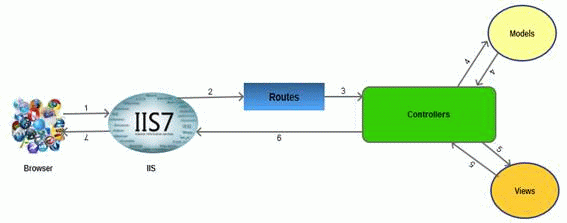
Explain MVC Architecture?
image1.gif

The architecture is self-explanatory. The browser (as usual) sends a request to IIS, IIS searches for the route defined in the MVC application and passes the request to the controller as specified by the route, the controller communicates with the model and passes the populated model (entity) to View (front end), Views are populated with model properties, and are rendered on the browser, passing the response to the browser through IIS via controllers that invoked the specified View.

What are the new features of MVC 2?

ASP.NET MVC 2 was released in March 2010. Its main features are:
  • Introduction of UI helpers with automatic scaffolding with customizable templates.
  • Attribute-based model validation on both client and server.
  • Strongly typed HTML helpers.
  • Improved Visual Studio tooling.
  • There were also many API enhancements and "pro" features, based on feedback from developers building a variety of applications on ASP.NET MVC 1, such as:
    • Support for partitioning large applications into areas.
    • Asynchronous controllers support.
    • Support for rendering subsections of a page/site using Html.RenderAction.
    • Many new helper functions, utilities, and API enhancements.
What are the new features of MVC 3?
ASP.NET MVC 3 shipped just 10 months after MVC 2 in Jan 2011. Some of the top features in MVC 3 included:
  • The Razor view engine.
  • Support for .NET 4 Data Annotations.
  • Improved model validation
  • Greater control and flexibility with support for dependency resolution and global action filters.
  • Better JavaScript support with unobtrusive JavaScript, jQuery Validation, and JSON binding.
  • Use of NuGet to deliver software and manage dependencies throughout the platform.
What are the new features of MVC 4?

The following are the top features of MVC 4:
  • ASP.NET Web API.
  • Enhancements to default project templates.
  • Mobile project template using jQuery Mobile.
  • Display Modes.
  • Task support for Asynchronous Controllers.
  • Bundling and minification.
Explain "page lifecycle" of ASP.NET MVC

The following processes are performed by ASP.NET MVC page::
  1. App initialization
  2. Routing
  3. Instantiate and execute controller
  4. Locate and invoke controller action
  5. Instantiate and render view
Advantages of MVC Framework
  1. Provides a clean separation of concerns among UI (Presentation layer), model (Transfer objects/Domain Objects/Entities) and Business Logic (Controller).
  2. Easy to UNIT Test.
  3. Improved reusability of views/model. One can have multiple views that can point to the same model and vice versa.
  4. Improved structuring of the code.
What is meant by Separation of Concerns?

As per Wikipedia 'the process of breaking a computer program into distinct features that overlap in functionality as little as possible'. The MVC design pattern aims to separate content from presentation and data-processing from content. 

Where do we see Separation of Concerns in MVC?
Between the data-processing (Model) and the rest of the application.

When we talk about Views and Controllers, their ownership itself explains separate. The views are just the presentation form of an application, it does not need to know specifically about the requests coming from the controller. The Model is independent of View and Controllers, it only holds business entities that can be passed to any View by the controller as required for exposing them to the end user. The controller is independent of Views and Models, its sole purpose is to handle requests and pass it on as per the routes defined and as per the need of rendering the views. Thus our business entities (model), business logic (controllers) and presentation logic (views) lie in logical/physical layers independent of each other.

What is Razor View Engine?

Razor is the first major update to render HTML in MVC 3. Razor was designed specifically as a view engine syntax. It has one main focus: code-focused templating for HTML generation. Here's how that same markup would be generated using Razor:
@model MvcMusicStore.Models.Genre@{ViewBag.Title = "Browse Albums";}<div class="genre"><h3><em>@Model.Name</em> Albums</h3><ul id="album-list">@foreach (var album in Model.Albums)
{
<li>
<
a href="@Url.Action("Details", new { id = album.AlbumId })"><img alt="@album.Title" src="@album.AlbumArtUrl" /><span>@album.Title</span></a>
</
li>}</ul>
</
div>

The Razor syntax is easier to type, and easier to read. Razor doesn't have the XML-like heavy syntax of the Web Forms view engine.

What is Unobtrusive JavaScript?
Unobtrusive JavaScript is a general term that conveys a general philosophy, similar to the term REST (Representational State Transfer). The high-level description is that unobtrusive JavaScript doesn't intermix JavaScript code in your page markup. For example, rather than hooking in via event attributes like onclick and onsubmit, the unobtrusive JavaScript attaches to elements by their ID or class, often based on the presence of other attributes (such as HTML5 data-attributes).

It's got semantic meaning and all of it; the tag structure, element attributes and so on should have a precise meaning. Strewing JavaScript gunk across the page to facilitate interaction (I'm looking at you, -doPostBack!) harms the content of the document.

What is JSON Binding?

MVC 3 included JavaScript Object Notation (JSON) binding support via the new JsonValueProviderFactory, enabling the action methods to accept and model-bind data in JSON format. This is especially useful in advanced Ajax scenarios like client templates and data binding that need to post data back to the server.

What is Dependency Resolution?
MVC 3 introduced a new concept called a dependency resolver, that greatly simplified the use of dependency injection in your applications. This made it easier to decouple application components, making them more configurable and easier to test.

Support was added for the following scenarios:
  • Controllers (registering and injecting controller factories, injecting controllers)
  • Views (registering and injecting view engines, injecting dependencies into view pages)
  • Action filters (locating and injecting filters)
  • Model binders (registering and injecting)
  • Model validation providers (registering and injecting)
  • Model metadata providers (registering and injecting)
  • Value providers (registering and injecting)
What are Display Modes in MVC 4?
Display modes use a convention-based approach to allow selecting various views based on the browser making the request. The default view engine first looks for views with names ending with ".Mobile.cshtml" when the browser's user agent indicates a known mobile device. For example, if we have a generic view titled "Index.cshtml" and a mobile view titled "Index.Mobile.cshtml" then MVC 4 will automatically use the mobile view when viewed in a mobile browser.

Additionally, we can register your own custom device modes that will be based on your own custom criteria, all in just one code statement. For example, to register a WinPhone device mode that would serve views ending with ".WinPhone.cshtml" to Windows Phone devices, you'd use the following code in the Application_Start method of your Global.asax:
DisplayModeProvider.Instance.Modes.Insert(0, new DefaultDisplayMode("WinPhone")
{
ContextCondition = (context => context.GetOverriddenUserAgent().IndexOf
(
"Windows Phone OS", StringComparison.OrdinalIgnoreCase) >= 0)});
What is AuthConfig.cs in MVC 4?

"AuthConfig.cs" configures security settings, including sites for OAuth login.

What is BundleConfig.cs in MVC 4?

"BundleConfig.cs" in MVC4 registers bundles used by the bundling and minification system. Several bundles are added by default, including jQuery, jQueryUI, jQuery validation, Modernizr, and default CSS references.

What is FilterConfig.cs in MVC 4?

This is used to register global MVC filters. The only filter registered by default is the HandleErrorAttribute, but this is a great place to put other filter registrations.

What is RouteConfig.cs in MVC 4?

"RouteConfig.cs" holds the granddaddy of the MVC config statements and Route configuration. 

What is WebApiConfig.cs in MVC 4?

Used to register Web API routes, as well as set any additional Web API configuration settings.

What's new for adding a controller in a MVC 4 application?

Previously (in MVC 3 and MVC 2), the Visual Studio Add Controller menu item only displayed when we right-clicked on the Controllers folder. However, the use of the Controllers folder was purely for organization. (MVC will recognize any class that implements the IController interface as a Controller, regardless of its location in your application.) The MVC 4 Visual Studio tooling has been modified to display the Add Controller menu item for any folder in your MVC project. This allows us to organize controllers however you would like, perhaps separating them into logical groups or separating MVC and Web API controllers.

What are the software requirements of an ASP.NET MVC 4 application?

MVC 4 runs on the following Windows client operating systems:
  • Windows XP
  • Windows Vista
  • Windows 7
  • Windows 8
It runs on the following server operating systems:
  • Windows Server 2003
  • Windows Server 2008
  • Windows Server 2008 R2
MVC 4 development tooling is included with Visual Studio 2012 and can be installed on Visual Studio 2010 SP1/Visual Web Developer 2010 Express SP1.

What are the various types of Application Templates used to create an MVC application?

The various templates are as follows:
  1. The Internet Application template: This contains the beginnings of an MVC web application, enough that you can run the application immediately after creating it
    and see a few pages. This template also includes some basic account management functions that run against the ASP.NET Membership.
     
  2. The Intranet Application template: The Intranet Application template was added as part of the ASP.NET MVC 3 Tools Update. It is similar to the Internet Application template, but the account management functions run against Windows accounts rather than the ASP.NET Membership system.
     
  3. The Basic template: This template is pretty minimal. It still has the basic folders, CSS, and MVC application infrastructure in place, but no more. Running an application created using the Empty template just gives you an error message.

    Why use Basic template? The Basic template is intended for experienced MVC developers who want to set up and configure things exactly how they want them.
     
  4. The Empty template: The Basic Template was previously called the Empty Template, but developers complained that it wasn't quite empty enough. With MVC 4, the previous Empty
    Template was renamed Basic, and the new Empty Template is about as empty as possible.

    It has the assemblies and basic folder structure in place, but that's about it.
     
  5. The Mobile Application template: The Mobile Application template is preconfigured with jQuery Mobile to jump-start creating a mobile only website. It includes mobile visual themes, a touch-optimized UI, and support for Ajax navigation.
     
  6. The Web API template: The ASP.NET Web API is a framework for creating HTTP services.

    The Web API template is similar to the Internet Application template but is streamlined for Web API development. For instance, there is no user account management functionality, since Web API account management is often significantly different from standard MVC account management. Web API functionality is also available in the other MVC project templates, and even in non-MVC project types.
What are the default Top-level directories created when adding a MVC 4 application?
The default Top-level directories are:
  • /Controllers: For Controller classes that handle URL requests
  • /Models: For classes that represent and manipulate data and business objects
  • /Views: For UI template files that are responsible for rendering output like HTML
  • /Scripts: For JavaScript library files and scripts (.js)
  • /Images: For images used in your site
  • /Content: For CSS and other site content, other than scripts and images
  • /Filters: For code filters
  • /App_Data:  To store data files you want to read/write
  • /App_Start: For configuration code of features like Routing, Bundling, Web API.
What is namespace of ASP.NET MVC?

ASP.NET MVC namespaces as well as classes are located in assembly System.Web.Mvc.

Note: Some of the content has been taken from various books/articles.

What is System.Web.Mvc namespace?
This namespace contains classes and interfaces that support the MVC pattern for ASP.NET Web applications. This namespace includes classes that represent controllers, controller
factories, action results, views, partial views, and model binders.

What is System.Web.Mvc.Ajax namespace?

The System.Web.Mvc.Ajax namespace contains classes that support Ajax scripting in an ASP.NET MVC application. The namespace includes support for Ajax scripts and Ajax option settings as well.

What is System.Web.Mvc.Async namespace?

The System.Web.Mvc.Async namespace contains classes and interfaces that support asynchronous actions in an ASP.NET MVC application.

What is System.Web.Mvc.Html namespace?

The System.Web.Mvc.Html namespace contains classes that help render HTML controls in an MVC application. This namespace includes classes that support forms, input controls, links, partial views, and validation.

What is ViewData, ViewBag and TempData?

MVC provides ViewData, ViewBag and TempData for passing data from the controller, view and in subsequent requests as well. ViewData and ViewBag are similar to some extent but TempData performs additional roles.

What are the roles and similarities between ViewData and ViewBag?
  • Maintains data when moving from controller to view.
  • Passes data from the controller to the respective view.
  • Their value becomes null when any redirection occurs, because their role is to provide a way to communicate between controllers and views. It's a communication mechanism within the server call.
What are the differences between ViewData and ViewBag (taken from a blog)?
  • ViewData is a dictionary of objects derived from the ViewDataDictionary class and accessible using strings as keys.
  • ViewBag is a dynamic property that takes advantage of the new dynamic features in C# 4.0.
  • ViewData requires typecasting for complex data types and checks for null values to avoid error.
  • ViewBag doesn't require typecasting for complex data types.
NOTE: Although there might not be a technical advantage to choosing one format over the other, there are some critical differences to be aware of between the two syntaxes.
One obvious difference is that ViewBag works only when the key being accessed is a valid C# identifier. For example, if you place a value in ViewData["KeyWith Spaces"] then you can't access that value using ViewBag because the code won't compile.

Another key issue to be aware of is that dynamic values cannot be passed in as parameters to extension methods. The C# compiler must know the real type of every parameter at compile time in order for it to choose the correct extension method.

If any parameter is dynamic then compilation will fail. For example, this code will always fail: @Html.TextBox("name", ViewBag.Name). To work around this, either use ViewData["Name"] or cast the value to a specifi c type: (string) ViewBag.Name.

What is TempData?
TempData is a dictionary derived from the TempDataDictionary class and stored in a short-lived session. It is a string key and object value.

It maintains the information for the duration of an HTTP Request. This means only from one page to another. It helps to maintain data when we move from one controller to another controller or from one action to another action. In other words, when we redirect Tempdata, it helps to maintain the data between those redirects. It internally uses session variables. Temp data used during the current and subsequent request only means it is used when we are sure that the next request will be redirecting to the next view. It requires typecasting for complex data types and checks for null values to avoid errors. Generally it is used to store only one-time messages, like error messages and validation messages.

How can you define a dynamic property using viewbag in ASP.NET MVC?

Assign a key name with the syntax "ViewBag.[Key]=[ Value]" and value using the equal to operator.

For example, you need to assign a list of students to the dynamic Students property of ViewBag as in the following:
List<string> students = new List<string>();countries.Add("Akhil");countries.Add("Ekta");
ViewBag.Students = students;
//Students is a dynamic property associated with ViewBag.
Note: Some of the content has been taken from various books/articles.

What is ViewModel (taken from stackoverflow)?

Accepted A view model represents data that you want to have displayed on your view/page.

Let's say that you have an Employee class that represents your employee domain model and it contains the following 4 properties:
public class Employee : IEntity
{
    
public int Id { get; set; } // Employee's unique identifier    public string FirstName { get; set; } // Employee's first name    public string LastName { get; set; } // Employee's last name    public DateTime DateCreated { get; set; } // Date when employee was created}
View models differ from domain models in that view models only contain the data (represented by properties) that you want to use on your view. For example, let's say that you want to add a new employee record, your view model might look like this:
public class CreateEmployeeViewModel{
    
public string FirstName { get; set; }
    
public string LastName { get; set; }}
As you can see it only contains 2 of the properties of the employee domain model. Why is this you may ask? Id might not be set from the view and it might be auto-generated by the Employee table. And DateCreated might also be set in the Stored Procedure or in the service layer of your application. So Id and DateCreated is not needed in the view model.

When loading the view/page, the create action method in your employee controller will create an instance of this view model, populate any fields if required, and then pass this view model to the view:
public class EmployeeController : Controller
{
    
private readonly IEmployeeService employeeService; 
    
public EmployeeController(IEmployeeService employeeService)
    {
        
this.employeeService = employeeService;
    } 
    
public ActionResult Create()
    {
        
CreateEmployeeViewModel viewModel = new CreateEmployeeViewModel();
        
return View(viewModel);
    } 
    
public ActionResult Create(CreateEmployeeViewModel viewModel)
    {
        
// Do what ever needs to be done before adding the employee to the database    }}
Your view might look like this (assuming you are using ASP.NET MVC3 and razor):
@model MyProject.Web.ViewModels.ProductCreateViewModel <table>
<
tr>
<
td><b>First Name:</b></td>
<
td>@Html.TextBoxFor(x => x.FirstName, new { maxlength = "50", size = "50" })@Html.ValidationMessageFor(x => x.FirstName)</td>
</
tr>
<
tr>
<
td><b>Last Name:</b></td>
<
td>@Html.TextBoxFor(x => x.LastName, new { maxlength = "50", size = "50" })@Html.ValidationMessageFor(x => x.LastName)</td>
</
tr></table>
Validation would thus be done only on FirstName and LastName. Using Fluent Validation you might have validation like this:
public class CreateEmployeeViewModelValidator : AbstractValidator
{
    
public CreateEmployeeViewModelValidator()
    {
        RuleFor(x => x.FirstName)
        .NotEmpty()
        .WithMessage(
"First name required")
        .Length(1, 50)
        .WithMessage(
"First name must not be greater than 50 characters"); 
        RuleFor(x => x.LastName)
        .NotEmpty()
        .WithMessage(
"Last name required")
        .Length(1, 50)
        .WithMessage(
"Last name must not be greater than 50 characters");
    }
}
The key thing to remember is that the view model only represents the data that you want to use. You can imagine all the unnecessary code and validation if you have a domain model with 30 properties and you only want to update a single value. Given this scenario you would only have this one value/property in the view model and not the entire domain object.

How do you check for AJAX requests with C# in MVC.NET?

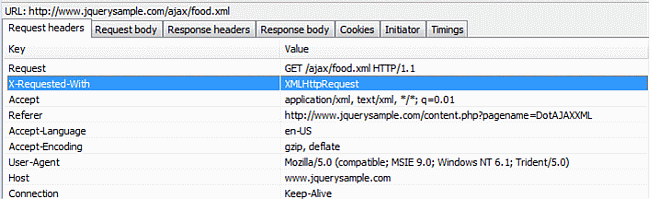
The solution is independed of the MVC.NET framework and is global across server side technologies. Most modern AJAX applications utilize XmlHTTPRequest to send async requests to the server. Such requests will have a distinct request header:

X-Requested-With = XMLHTTPREQUEST
image2.gif

MVC.NET provides helper functions to check for ajax requests that internally inspects the "X-Requested-With" request header to set the "IsAjax" flag.

What are Scaffold templates?

These templates use the Visual Studio T4 templating system to generate a view based on the model type selected. Scaffolding in ASP.NET MVC can generate the boilerplate code we need to create, read, update, and delete (CRUD) functionality in an application. The scaffolding templates can examine the type definition for it then generate a controller and the controller's associated views. The scaffolding knows how to name controllers, how to name views, what code needs to go to each component, and where to place all these pieces in the project for the application to work.

What are the types of Scaffolding Templates?
  • Empty: Creates an empty view. Only the model type is specified using the model syntax.
  • Create:  Creates a view with a form for creating new instances of the model.
    Generates a label and input field for each property of the model type.
  • Delete:  Creates a view with a form for deleting existing instances of the model.
    Displays a label and the current value for each property of the model.
  • Details:  Creates a view that displays a label and the value for each property of the model type.
  • Edit:  Creates a view with a form for editing existing instances of the model.
    Generates a label and input field for each property of the model type.
  • List:  Creates a view with a table of model instances. Generates a column for each property of the model type. Make sure to pass an IEnumerable to this view from your action method.
The view also contains links to actions for performing the create/edit/delete operations.

Show an example of the difference in syntax in Razor and WebForm Views
Razor <span>@model.Message</span>Web Forms <span><%: model.Message %></span>

Code expressions in Razor are always HTML encoded. This Web Forms syntax also automatically HTML encodes the value.

What are Code Blocks in Views?

Unlike code expressions that are evaluated and sent to the response, blocks of code are simply sections of code that are executed. They are useful for declaring variables that we may need to use later.

Razor 
@{int x = 123;string y = ˝because.˝;}
Web Forms 
<%
int x = 123;
string y = "because.";
%>

What is the "HelperPage.IsAjax" Property?
The HelperPage.IsAjax property gets a value that indicates whether Ajax is being used during the request of the Web page.

Namespace: System.Web.WebPages
Assembly: System.Web.WebPages.dll

However, the same can be done by checking request headers directly:
Request["X-Requested-With"] == "XmlHttpRequest". 

Explain combining text and markup in Views using an example

This example shows what intermixing text and markup looks like using Razor as compared to Web Forms:

Razor 
@foreach (var item in items) {<span>Item @item.Name.</span>}
Web Forms 
<% foreach (var item in items) { %>
Item <%: item.Name %>.
<% } %>

Explain Repository Pattern in ASP.NET MVC
In simple terms, a repository basically works as a mediator between our business logic layer and our data access layer of the application. Sometimes it would be troublesome to expose the data access mechanism directly to the business logic layer, it may result in redundant code for accessing data for similar entities or it may result in code that is hard to test or understand. To overcome these kinds of issues, and to write interface driven and test driven code to access data, we use the Repository Pattern. The repository makes queries to the data source for the data then maps the data from the data source to a business entity/domain object and finally persists the changes in the business entity to the data source. According to MSDN, a repository separates the business logic from the interactions with the underlying data source or Web Service. The separation between the data and business tiers has the following three benefits:
  • It centralizes the data logic or Web service access logic.
  • It provides a substitution point for the unit tests.
  • It provides a flexible architecture that can be adapted as the overall design of the application evolves.
In a Repository we write our entire business logic of CRUD operations using Entity Framework classes that will not only result in meaningful test driven code but will also reduce our controller code of accessing data.

How can you call a JavaScript function/method on the change of a Dropdown List in MVC?
Create a JavaScript method:
<script type="text/javascript">    function selectedIndexChanged() {
    }
</script>

Invoke the method:

<%:Html.DropDownListFor(x => x.SelectedProduct,
new SelectList(Model.Users, "Value", "Text"),
"Please Select a User", new { id = "ddlUsers",
onchange="selectedIndexChanged()" })%>

Explain Routing in MVC
A route is a URL pattern that is mapped to a handler. The handler can be a physical file, such as an .aspx file in a Web Forms application. A Routing module is responsible for mapping incoming browser requests to specific MVC controller actions.

Routing within the ASP.NET MVC framework serves the following two main purposes:
  • It matches incoming requests that would not otherwise match a file on the file system and maps the requests to a controller action.
  • It constructs outgoing URLs that correspond to controller actions.
How is a route table created in ASP.NET MVC?
When an MVC application first starts, the Application_Start() method in global.asax is called. This method calls the RegisterRoutes() method. The RegisterRoutes() method creates the route table for the MVC application.

What are Layouts in ASP.NET MVC Razor?
Layouts in Razor help maintain a consistent look and feel across multiple views within our application. Compared to Web Forms Web Forms, layouts serve the same purpose as master pages, but offer both a simpler syntax and greater flexibility.

We can use a layout to define a common template for your site (or just part of it). This template contains one or more placeholders that the other views in your application provide content for. In some ways, it's like an abstract base class for your views. For example declared at the top of view as in the following:
@{Layout = "~/Views/Shared/SiteLayout.cshtml";}

What is ViewStart?
For group of views that all use the same layout, this can get a bit redundant and harder to maintain.

The "_ViewStart.cshtml" page can be used to remove this redundancy. The code within this file is executed before the code in any view placed in the same directory. This file is also recursively applied to any view within a subdirectory.

When we create a default ASP.NET MVC project, we find there is already a "_ViewStart .cshtml" file in the Views directory. It specifies a default layout as in the following:
@{Layout = "~/Views/Shared/_Layout.cshtml";}
Because this code runs before any view, a view can override the Layout property and choose a different one. If a set of views shares common settings then the "_ViewStart.cshtml" file is a useful place to consolidate these common view settings. If any view needs to override any of the common settings then the view can set those values to another value.

Note: Some of the content has been taken from various books/articles.

What are HTML Helpers?

HTML helpers are methods we can invoke on the Html property of a view. We also have access to URL helpers (via the URL property) and AJAX helpers (via the Ajax property). All
these helpers have the same goal, to make views easy to author. The URL helper is also available from within the controller.

Most of the helpers, particularly the HTML helpers, output HTML markup. For example, the BeginForm helper is a helper we can use to build a robust form tag for our search
form, but without using lines and lines of code:
@using (Html.BeginForm("Search", "Home", FormMethod.Get)) {<input type="text" name="q" />
<
input type="submit" value="Search" />}
What is Html.ValidationSummary?
The ValidationSummary helper displays an unordered list of all validation errors in the ModelState dictionary. The Boolean parameter you are using (with a value of true) is telling the helper to exclude property-level errors. In other words, you are telling the summary to display only the errors in ModelState associated with the model itself, and exclude any errors associated with a specific model property. We will be displaying property-level errors separately. Assume you have the following code somewhere in the controller action rendering the edit view:

ModelState.AddModelError("", "This is all wrong!");
ModelState.AddModelError("Title", "What a terrible name!");

The first error is a model-level error, because you didn't provide a key (or provided an empty key) to associate the error with a specific property. The second error you associated with the Title property, so in your view it will not display in the validation summary area (unless you remove the parameter to the helper method, or change the value to false). In this scenario, the helper renders the following HTML:
<div class="validation-summary-errors">
<
ul>
<
li>This is all wrong!</li>
</
ul>
</
div>

Other overloads of the ValidationSummary helper enable you to provide header text and set specific HTML attributes.

NOTE: By convention, the ValidationSummary helper renders the CSS class validation-summary-errors along with any specific CSS classes you provide. The default MVC project template includes some styling to display these items in red, that you can change in "styles.css".

What are Validation Annotations?
Data annotations are attributes you can find in the "System.ComponentModel.DataAnnotations" namespace. These attributes provide server-side validation, and the framework also supports client-side validation when you use one of the attributes on a model property. You can use four attributes in the DataAnnotations namespace to cover the common validation scenarios, Required, String Length, Regular Expression and Range.

What is Html.Partial?
The Partial helper renders a partial view into a string. Typically, a partial view contains reusable markup you want to render from inside multiple different views. Partial has four overloads:
public void Partial(string partialViewName);public void Partial(string partialViewName, object model);public void Partial(string partialViewName, ViewDataDictionary viewData);public void Partial(string partialViewName, object model,
ViewDataDictionary viewData);


What is Html.RenderPartial?

The RenderPartial helper is similar to Partial, but RenderPartial writes directly to the response output stream instead of returning a string. For this reason, you must place RenderPartial inside a code block instead of a code expression. To illustrate, the following two lines of code render the same output to the output stream:
@{Html.RenderPartial("AlbumDisplay "); }
@
Html.Partial("AlbumDisplay ")
If they are same then which one to use?

In general, you should prefer Partial to RenderPartial because Partial is more convenient (you don't need to wrap the call in a code block with curly braces). However, RenderPartial may result in better performance because it writes directly to the response stream, although it would require a lot of use (either high site traffic or repeated calls in a loop) before the difference would be noticeable.

How do you return a partial view from controller?
return PartialView(options); //options could be Model or View name

What are various ways of returning a View?

There are various ways for returning/rendering a view in MVC Razor. For example "return View()", "return RedirectToAction()", "return Redirect()" and "return RedirectToRoute()".